

At CodeGeek, we love building awesome web experiences—from websites to web apps and everything in between. And we have a passion for making sure web experiences are accessible for everyone.
So, when it comes to web accessibility, we often get asked: How much will it cost to make my website accessible?
That’s a super complex question, and our answer is based on some key factors.
Factor #1: How conformant do you want your website to be?
One of the most commonly followed guidelines for website accessibility are the Web Content Accessibility Guidelines.
There are three levels of conformance:
- Level A (easiest)
- Level AA
- Level AAA (most difficult)
Factor #2: How much work is involved?
The most commonly targeted conformance level is Level AA. Under WCAG 2.2, there are 55 Level A and Level AA success criteria that must be met.
The work involved includes detailed labor with regard to design, functionality, structure (HTML code) and content.
Some guidelines are simpler to implement than others:
- alt text for meaningful images
- proper HTML structure and labels for form elements
- logical page markup and heading structure
- sufficient color contrast for text and interface elements
- ensuring information and functionality are apparent without relying solely on color
- link purpose can be determined from the link’s text or context
Some guidelines are more complex and can require significantly more labor and/or decision-making to conform:
- all site functionality available via keyboard
- keyboard focus visible, follows a logical order, and not obscured by other content
- controls available to pause, stop, or hide automatically moving content such as sliders
- interactive elements can be accessed and exited with a keyboard without trapping the user
- adequately sized or spaced targets for links, buttons, and other controls
- alternatives for any functionality that requires dragging
- clear identification of form errors and suggestions for correcting them
- avoiding unnecessary re-entry of information during multi-step processes
- accessible login and authentication processes
- captions and other required alternatives for audio and video content
Much of this work needs to be completed by a web development team (like the Geeks!), ideally during the website build itself. We use a number of tools to assess the conformance status of each page—and then we get to work.
Pro tip » Learn more about some of these web accessibility issues by checking out our fun, interactive Accessibility (A11y) Adventure.
Factor #3: Who will make sure your site remains accessible?
The ultimate goal is to make your website usable for the largest number of people possible—and keep it that way over time. So, who makes that happen?
1. Content Editors
Many guidelines are content related, so your content editors need to receive quality conformance training. At CodeGeek, we provide such training up front during the website build, and we also provide recurrent training once or twice per year for our clients.
2. Usability Testers
While many accessibility guidelines are very technical, conforming with these guidelines is not all that’s needed. Performing regular and practical usability testing is also a must.
Usability testing involves testing a website in different contexts to discover usability issues. Two common testing examples are performing keyboard tests (navigation, logical ordering, forms) and screen reader tests (understandability, navigation, forms).
So, how much will it cost to make my website accessible?
As you can see, there is a lot to making a website accessible.
There isn’t a simple answer to the total cost because it depends significantly on:
- the complexity of the site
- how much content there is
- the nature of the content (text, images, video, audio, etc.)
- when you decide to address accessibility for your website
Option 1 – During the initial website build
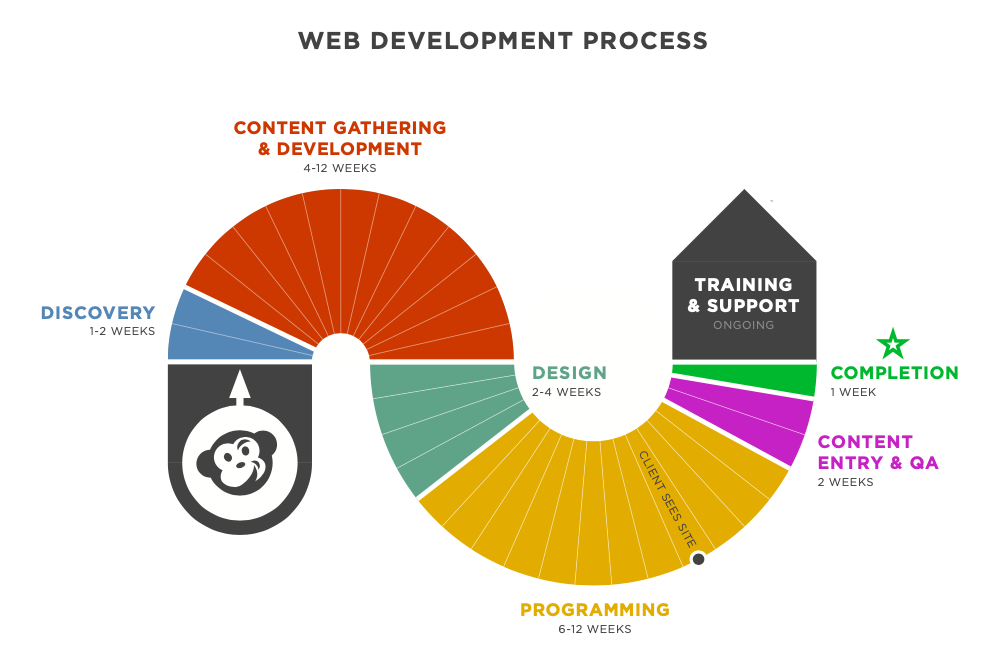
The absolute best time to address the accessibility of your website is before and during the build process.
By implementing as many WCAG guidelines as possible into your website during the design and development phases, the cost of accessibility is lower because code and design issues are addressed from the start.
If web accessibility is addressed during the website build, our high-level answer about the cost of accessibility is: To make a simple-to-moderately-sized website Level AA conformant, we often estimate an additional 25% of the total cost for the design and build process.
This can vary depending on the complexity of your site, but it’s a good starting point for a meaningful discussion.
To make a simple-to-moderately-sized website Level AA conformant, we often estimate an additional 25% of the total cost for the design and build process.
Option 2 – After your website is built
If your website is on the older side or you didn’t consider accessibility before it was built, not all is lost!
Auditing an already-built site and then remediating accessibility issues can take time, but the cost is well worth it so that more and more people can enjoy your business’ most important digital asset. Plus, an accessible website reduces additional risk—of lost business, potential lawsuits, and more.
That’s why at CodeGeek, we offer Monthly Accessibility Plans (MAPs). Web accessibility is an ongoing process, and our plans are the most effective way to continuously improve your website through monthly accessibility audits and remediation.
We offer four Monthly Accessibility Plans to map out the best course of action based on your budget and timeline.
Still on the fence about web accessiblity?
If you’re still not sure if it’s worth making your site accessible, ask yourself this: What is the cost of not making my site accessible?
And then check out our Accessibility services page to read more about the business case for accessibility.
What is the cost of not making your website accessible?

An edited version of this post was originally written by CodeGeek and published by WordPress Accessibility Day 2020. (Republished by permission. Updated July 25, 2023, and August 21, 2026.)
Featured image source: Robin Worrall on Unsplash